Free tool for Windows
File-INNsider
Signature and checksums of a file at a glance - with a right-click in Windows Explorer. Offline, no additional runtimes, in English and German.
What File-INNsider shows
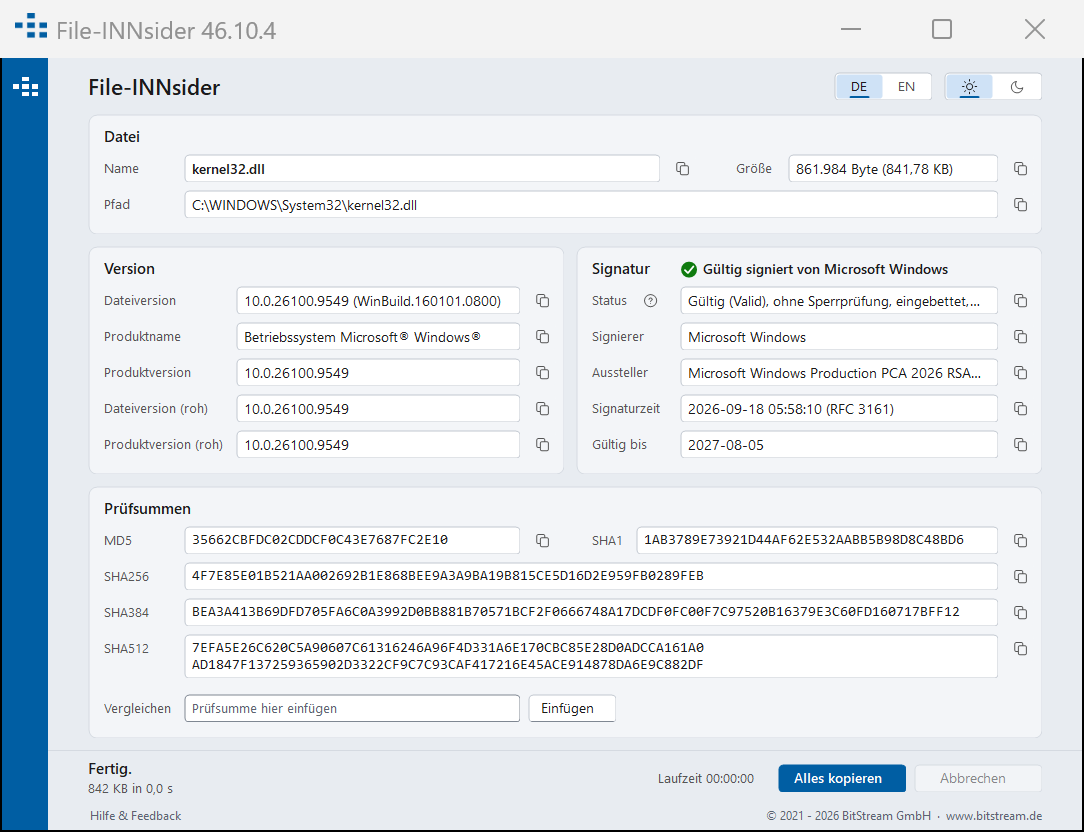
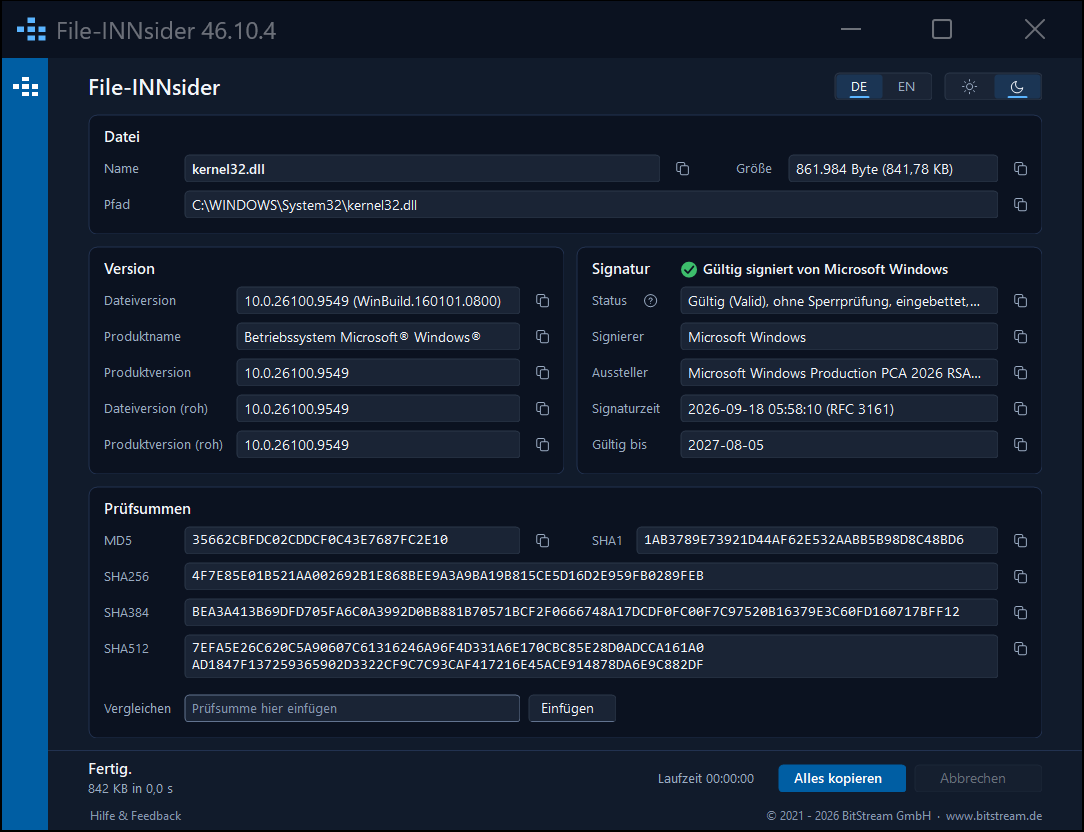
Right-click a file, choose "File-INNsider" - and one window shows, in three blocks, what Windows knows about that file:
-
File and version
Name, path, size in bytes, file version, product name and product version. -
Signature
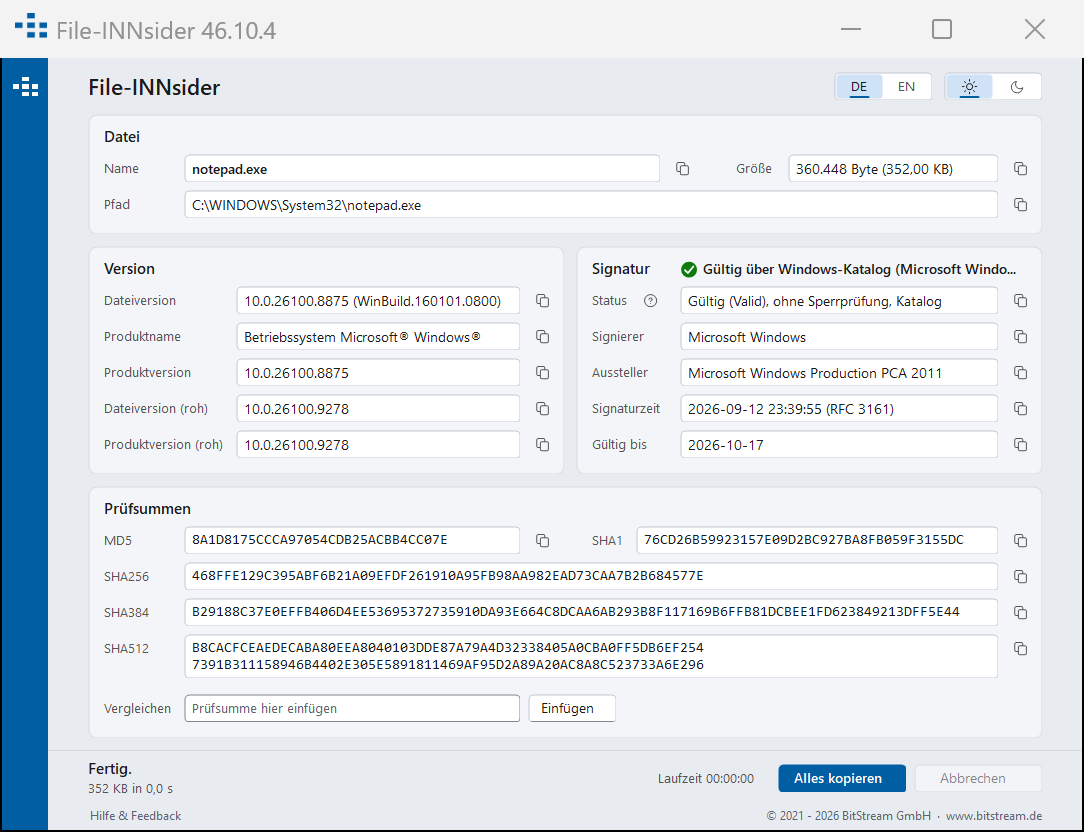
Status with explanation, signer, issuer, signing time from the timestamp, valid until, signature type embedded or Windows catalog. -
Checksums
MD5, SHA-1, SHA-256, SHA-384 and SHA-512 from a single read pass. The "Compare" field recognises the algorithm by the length of the pasted value and highlights a match.
Every line can be copied on its own; "Copy all" delivers the whole block as text.
What you need it for
-
Check downloads before you run them
Does the installer really come from the named vendor, and is it unchanged since it was signed? File-INNsider verifies that with Windows' own means and explains every status in plain language - error code included. -
Compare checksums without a command line
Paste the hash the vendor publishes - done. Nocertutil, no PowerShell command, no counting characters. -
Document approvals
"Copy all" delivers file name, size, status, signer and all checksums as a text block - for the ticket, the approval record or the software inventory. -
Large files without waiting
One read pass for all five algorithms, spread across several processor cores, with progress in percent and MB/s - cancel at any time.
Features
-
Verification offline
Signature and checksums are computed entirely on your computer (WinVerifyTrust). The application does not go online for that. -
Catalog signatures and timestamps
Windows system files are signed through a catalog - File-INNsider recognises that. RFC 3161 timestamps are evaluated: an expired but timestamped signature remains valid. -
An explanation for every status
The question mark next to "Status" leads straight to the matching section of this page. -
Drag & drop
Drop a file onto the open window and it is checked anew. -
English and German, light and dark
Language switchable in the window; colour scheme follows the Windows setting or your choice; scales cleanly on high-resolution displays. -
No additional runtimes
Runs on .NET Framework 4.8, which is part of Windows 10 and 11. One program file of about 180 KB, an MSI package under 1 MB. -
Nothing phones home
No log file, no telemetry, no advertising. The only network connection is a daily look for a new version, which can be switched off (see For IT departments). -
Signed
Program and installer carry the code signature of BitStream GmbH - feel free to verify it with File-INNsider itself.
Download
File-INNsider 46.10.4
- File
BitStream_File-INNsider_46.10.4_x64.msi- Size
- 560 KB (573,440 bytes)
- SHA-256
2B2920C5A33A42AB5171B6A14E74562DD166C73EFB34EA834A358263A4DD2584- Signature
- BitStream GmbH (Authenticode)
- Requirements
- Windows 10 or 11, 64-bit; .NET Framework 4.8 (included in Windows)
- Installation
- Windows Installer, administrator rights; English user interface, German on a German Windows
After installation you will find File-INNsider in the Explorer context menu (right-click a file; on Windows 11 behind "Show more options") and, if you choose, in the Start menu. A new package replaces an older version; if the installation fails, the old one stays in place.
For private users File-INNsider is free, without registration. Businesses and public authorities register briefly - free of charge or with a support contract. Details under License.
What does the signature status mean?
File-INNsider verifies signatures with Windows' own means (WinVerifyTrust) and without network access. Whether a certificate has been revoked in the meantime is therefore not queried; the "Status" line says so: "no revocation check". The sections below explain every status the application can show - the question mark next to "Status" leads straight here.
- Valid
- Not signed (NotSigned)
- No signature (0x800B0003)
- Content changed (0x80096010)
- Signature block damaged (0x8009200D)
- Certificate tampered with (0x80096004)
- Signature block modified (0xC000A000 and others)
- Timestamp does not match (0x80096005)
- Not trusted (NotTrusted)
- Not trusted (0x800B0004)
- Root certificate not trusted (0x800B0109)
- Certificate chain incomplete (0x800B010A)
- Certificate expired (0x800B0101)
- Certificate revoked (0x800B010C)
- File type carries no signature (NotSupportedFileFormat)
- Algorithm not supported (Incompatible)
Valid
The file carries a signature that matches its content, and the signer's certificate chains to an authority this computer trusts. The file has not been changed since it was signed.
- embedded: the signature is part of the file itself.
- catalog: the file is listed in a Windows catalog (common for Windows system files); the catalog is signed, not the file.
- Signing time: taken from the timestamp of a timestamping service. With a timestamp the signature stays valid even after the certificate expires ("expired, timestamp holds").
Valid means: the file comes unchanged from the named signer. It does not mean the file is harmless.
Not signed (NotSigned)
The file type could carry a signature (EXE, DLL, MSI, PS1 …), but this file has none - or it has a signature block whose signature does not match ("Signature invalid"). In the first case nothing is known about its origin; in the second, the block or the file has been altered.
No signature (0x800B0003)
There is no signature format for this file type (text files, images, most data files). This is normal, not a defect. Use the checksums below to compare against a published value.
Invalid: content changed after signing (0x80096010)
The signature is genuine but no longer matches the content: the file was modified after signing - by a corrupted transfer, by a tool that "repaired" it, or deliberately. Do not run it; obtain it again from a trustworthy source.
Invalid: signature block damaged (0x8009200D)
The signature block itself can no longer be read. Again: the file is not in the state in which it was signed.
Invalid: certificate in signature block tampered with (0x80096004)
The certificate shipped inside the signature block does not carry a valid signature of its issuer. This is what a forged or modified signature block looks like. The names shown come from the block only and are backed by nothing - File-INNsider marks them "unverified".
Invalid: signature block modified (0xC000A000, 0x80091007, 0x80090006)
The signature in the block cannot be confirmed: the block was changed after signing. Depending on where, Windows reports one of these three codes.
Invalid: signature timestamp does not match (0x80096005)
The timestamp in the signature block cannot be confirmed. Without a valid timestamp there is no proof of when the file was signed.
Not trusted (NotTrusted)
The signer's certificate is explicitly blocked on this computer (it is in the "Untrusted Certificates" store). Do not run the file, and ask whoever manages the computer why the publisher is blocked.
Not trusted (0x800B0004)
The signature is technically sound, but this computer does not trust the signer. The name shown is merely claimed.
Root certificate not trusted (0x800B0109)
The certificate chain ends at an authority this computer does not know. Typical for self-signed certificates and for corporate certificates on a computer outside that company. The signer's name is therefore unproven: a self-signed certificate can carry any name.
Certificate chain incomplete (0x800B010A)
A link is missing between the signer's certificate and a trusted authority. Because File-INNsider checks offline, a missing intermediate certificate is not downloaded. On a computer with network access and current certificates the same file may be valid.
Certificate expired, signature without timestamp (0x800B0101)
The signer's certificate has expired, and the signature has no timestamp proving that it was made before the expiry. The file may be genuine - it can no longer be proven.
Certificate revoked (0x800B010C)
The issuer has withdrawn the certificate, for example because the key was stolen, and this computer already knows. Do not run the file.
File type carries no signature (NotSupportedFileFormat)
Windows has no verification method for this file type. As with "No signature": not a defect.
Signature algorithm not supported (Incompatible)
The signature uses an algorithm this Windows version does not know. Check again on a newer system.
Frequently asked
Why "no revocation check"?
Because File-INNsider deliberately stays offline. If you need the
revocation status, verify additionally with signtool verify /pa /v
or sigcheck -r.
Why "unverified:" in front of some values?
Without a valid signature, signer, issuer and time come from the signature block only - and anyone can write that.
What are the checksums for?
To compare with the value the vendor publishes. Paste it into "Compare"; File-INNsider recognises the algorithm by its length.
What happens if I drop several files onto the window?
The first one is checked; a note at the bottom of the window says so. A bulk comparison against a list of expected checksums is on the wish list.
Why is it called INNsider?
A play on the Inn - the river on which BitStream is at home in Passau, Germany. And on the look inside a file.
For IT departments
Deployment
The MSI installs with any deployment tool, for example
msiexec /i BitStream_File-INNsider_46.10.4_x64.msi /qn.
Properties on the command line:
STARTMENUE=0- no Start menu entry, context menu only.UPDATEPRUEFUNG=0- no check for a newer version.WEBLINKS=0- no links to this website in the window (the bottom line becomes plain text, the question mark disappears).TRANSFORMS=:1031- German installer interface on a non-German Windows.
Policies
The values UpdatePruefung and Weblinks (DWORD, 0 = off)
apply in this order of precedence:
HKLM\Software\Policies\BitStream\File-INNsider(Group Policy, computer)HKCU\Software\Policies\BitStream\File-INNsider(Group Policy, user)HKLM\Software\BitStream\File-INNsider(computer default; written by the MSI)HKCU\Software\BitStream\File-INNsider(the user's choice: right-click the line at the bottom right of the window)
If the check is set by 1 to 3, the user's menu item is locked.
What the application transmits
Only the check for a newer version: one request for the file
https://www.bitstream.de/file-innsider/version.txt over HTTPS,
at most once a day per user, in the background, never in test mode. The only
thing sent along is the application's own version number as its identifier
(User-Agent: File-INNsider/46.10.4); as with any request, the web
server sees the IP address. Nothing about the examined file, the computer or
the user. Nothing is downloaded or executed - if a newer version exists, the
window shows a hint that leads to this page.
Links open the browser only after a click; the address then carries at most
the signature status with its error code (in the part after #,
which the browser does not send to the server). The verification of the file
itself never goes online. Details in the
privacy policy.
License
Private use
Free, without registration. Download, install, verify.
Businesses and public authorities
For use within an organisation, register briefly - company, contact person, e-mail address. Free of charge if we may inform you at this address about new versions and products from BitStream. With a support contract if you want assistance with deployment and operation or prefer not to be contacted - terms on request.
Register for business useFile-INNsider is provided without warranty; it verifies signatures without a revocation check and does not replace a security assessment of the examined file. The installation package may be passed on unmodified. The source code is not part of the offer.
Help and feedback
The "Help & feedback" link at the bottom left of the window leads here. This page holds the explanation of every signature status and the download of the current version.
We welcome questions, error reports and suggestions through the contact form or by e-mail. For a query, the text from "Copy all" helps: it contains file name, status, signer and checksums, but nothing about your computer. The application itself sends nothing.
Or directly: +49 851 204248-0 · info@bitstream.de