Deployment system for Windows devices
omniDEPLOY
Install, harden and verifiably deliver Windows devices automatically - no Intune, no domain. On-premises in your own network, even without any internet, or operated by BitStream as SaaS.
What omniDEPLOY is made for
Some devices will never see Intune or Active Directory: industrial PCs on the line, kiosk and operator terminals, machines in isolated networks, special workstations with requirements for hardening and proof. Classic client management does not reach them - and a USB stick with an image is not a process. omniDEPLOY is built for these devices.
-
Networks without internet and without a domain
The deployment server brings everything along: DNS, DHCP, network boot, images, drivers, packages. It never needs to reach outside. -
Secure Boot stays on
The boot chain is signed end to end. No device is opened for it, no firmware setting loosened. -
Proof instead of trust
Who approved which device when, and which build landed on it, is in the device record - verifiable through hashes, not through memory. -
Hardening is part of it
CIS, BSI or Microsoft Security Baseline are applied during deployment and checked against the target after the first boot. -
Patching means redeploying
After installation a device stays unchanged. A new build is a new, versioned template - no configuration drift over the years.
How omniDEPLOY works

- Boot. The device starts via PXE with Secure Boot enabled and loads a lean WinPE from the deployment server. The logic does not live in the image but in a runbook on the server - order and scope are data, not code.
- Identify. The device reports its hardware traits (mainboard, disks, memory, TPM). The server matches it to a device record; the MAC address is only the session key. Unknown devices are taken in by the intake wizard of the web console.
- Approve. Before any disk is wiped, a person approves - with name, reason and time. The machine may suggest a profile; it does not decide.
- Install and harden. Windows image, drivers per model, application packs in a defined order, computer name, hardening level - all from one versioned template, every file pinned by SHA-256.
- Prove. The device reports a deploy record and, at first boot, a compliance check; the server verifies against the template's target. Only then does the device count as delivered.
Two operating models
On-premises
The deployment server runs with you - as a VM or on your own hardware, on Linux, hardened to BSI IT-Grundschutz building blocks, in FIPS mode if required. It needs no connection to the outside: images, drivers, packages and configuration arrive as a signed release on removable media from the build environment. For isolated networks, regulated environments and wherever data must not leave the premises.
As SaaS
BitStream operates server, artefact store and console for you - hosted in the EU, maintained, up to date. Your devices are provisioned at your site; what is needed on site is defined in the project. For organisations that want verifiable deployment without maintaining a deployment system of their own.
The same principle applies in both models: content is produced in a build environment and moved through the stages dev, qa, uat and prod as immutable versions. Whoever goes to production moves a pointer - never content.
What omniDEPLOY brings
-
Deployment server on Linux
DNS, DHCP with boot switch, TFTP, HTTP and SMB, plus the intake API without third-party dependencies and the web console. Built in numbered, repeatable stages; an acceptance gate checks the server before it provisions devices. -
Hardened from the start
SELinux, audit rule set, integrity checking with AIDE, local time source, firewall with default "drop", SSH by key only. -
Device record and approval
Recognition by weighted hardware traits; states discovered, classified, approved; every approval with evidence. -
Templates ("appliances")
Image, disk layout, switches, software and hardening assignment, computer name from prefix and serial number - versioned, with hash. -
Windows images
Windows 10 IoT Enterprise LTSC 2021 and Windows 11 LTSC. The original image stays untouched; updates are serviced offline and versioned as a new build. A Linux path is planned. -
Drivers per model
Harvested from the reference device, checked, versioned as a pack, injected during deployment - complete, not as a delta. -
Application packs
Versioned packs with SHA-256 pin, installed at first boot in the order of the template, packaged to a fixed style guide. -
Hardening as a catalogue
CIS (level 2), BSI, Microsoft Security Baseline or your own requirements - as versioned layers with defined conflict resolution, every relaxation justified individually.
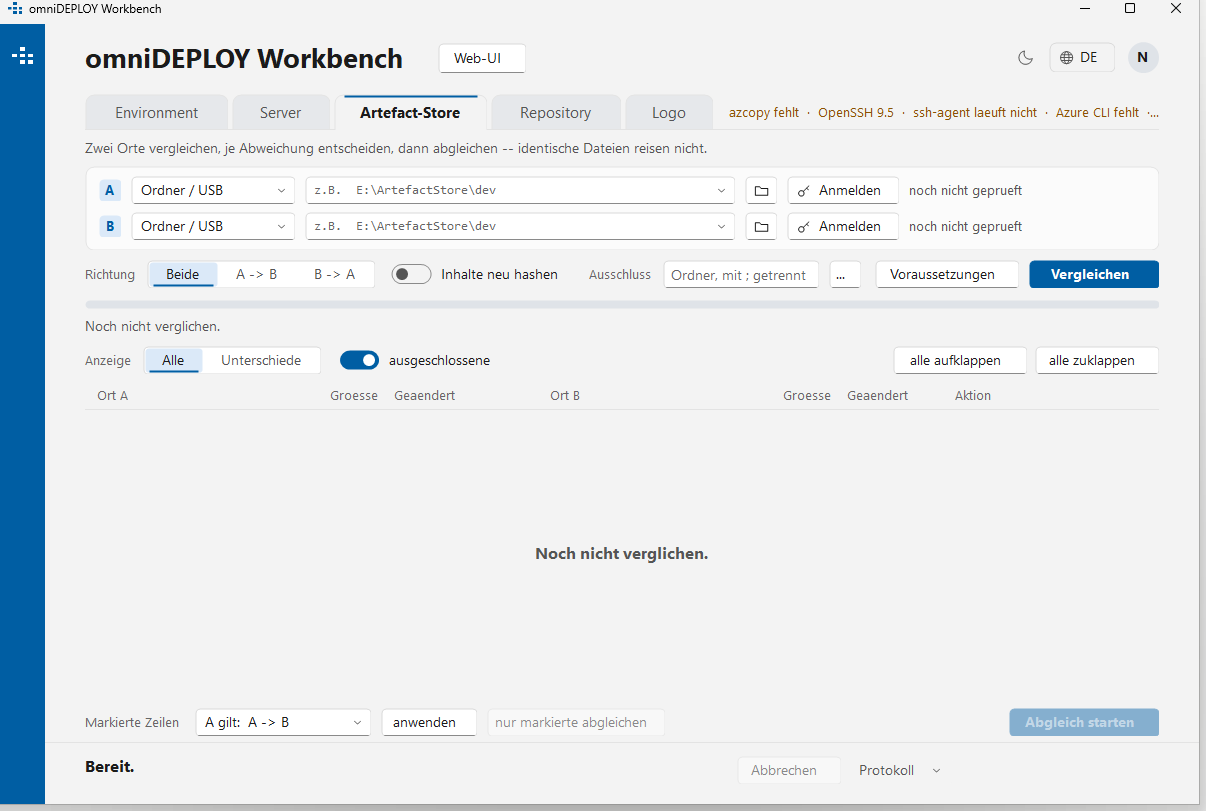
omniDEPLOY Workbench for the Windows workstation: maintain the environment file, synchronise the artefact store (local, USB, blob), sync the repository, build and accept the deployment server from the workstation, store the customer logo. One EXE, light and dark, German and English.
Secure Boot stays on
Many network boot solutions only work with Secure Boot switched off. omniDEPLOY takes the other road: every link of the boot chain is signed and verified when loaded - from the Microsoft-signed shim through the own iPXE, trusted via Machine Owner Key, to the Windows boot manager with the Windows UEFI CA 2023. That makes the chain resilient against BlackLotus (CVE-2023-24932), and the firmware settings of your devices stay as they are.

What omniDEPLOY deliberately does not do
omniDEPLOY is not enterprise client management and does not want to be. Some functions known from MDT or Intune are missing on purpose - because they would break the chain of evidence at a point where nobody is looking.
- No domain join - the device's identity is its record, not a computer account.
- No profile migration - wipe is the doctrine; on kiosk and industrial devices there is no user state worth migrating.
- No free task sequence editor - the fixed, reviewed sequence is the anchor of auditability.
- No golden image - the original image stays untouched; speed comes from prepared image builds.
- No wizard on the device - decisions are made at the console, where the evidence is created.
- No configuration management afterwards - devices stay unchanged; change means new version and redeploy.
Standards and evidence
- Secure Boot - trust model (UEFI db, MOK, Authenticode) documented and proven; boot binaries with CA 2023.
- Hardening - CIS Benchmarks, BSI, Microsoft Security Baselines; target/actual check after the first boot.
- Server operation - BSI IT-Grundschutz building blocks for logging, time synchronisation, integrity, network segmentation and Linux hardening.
- Evidence - deploy records, compliance reports, hash inventory, batch protocols; versions immutable, anchored in Git.
- Data protection - the project documentation is pseudonymised: customer names, hosts and addresses never appear in sources or tools, only on the customer's server.
- Cryptography - server operation in FIPS mode available.
Technical facts
- Server
- Linux (Red Hat Enterprise Linux), VM or physical, one server per site; FIPS mode optional
- Clients
- UEFI devices with Secure Boot, heterogeneous industrial and standard PCs; Windows 10 IoT Enterprise LTSC 2021, Windows 11 LTSC; Linux planned
- Transport
- PXE/TFTP for the first loader, HTTP and SMB for WinPE, images and packages; no internet required
- Tools
- Web console on the server; omniDEPLOY Workbench on Windows; build environment with network access for images, drivers and packages
- Evidence
- Device record, approval evidence, deploy record, compliance report, hash inventory, acceptance gate
- Supply chain
- Artefact store with manifest, signed release export, transfer on removable media or through a data lock; stages dev, qa, uat, prod
- Operation
- On-premises or as SaaS (EU hosting by BitStream)
Introduction and availability
omniDEPLOY is not off-the-shelf software. It grows out of an ongoing customer project and is becoming a product step by step; what you read on this page is built and proven in the lab. The introduction runs as a project in four steps:
- Target picture and model groups - which devices, which networks, which requirements for hardening and proof.
- Lab instance at BitStream - intake of the reference devices, images, drivers, packages, internal acceptance, release export.
- Your instance - on-premises or as SaaS: import of the release, acceptance in uat, promotion to prod.
- Handover - operations manual, training, operating model with clear roles; after that we accompany the builds.
License and introduction project are agreed per project. For hardening your devices and the questions before that, our consulting is available.
Get to know omniDEPLOY
Target picture, model groups and operating model are discussed in a first conversation - or you watch a deployment in the lab.
Or directly: +49 851 204248-0 · info@bitstream.de